
Google AI Edge Gallery
APK 1.0.3Let's build community together and explore the coolest world of APK Games/Apps.
Explore generative AI offline with Google AI Edge Gallery APK. Run models locally, test performance, and interact with AI on Android and iOS—no internet required.
Information
Google AI Edge Gallery APK: Redefining On-Device Generative AI for Android and iOS
Artificial intelligence is entering a new era—one where powerful generative models are no longer confined to data centers and cloud APIs. With the rise of edge computing, Google is leading the charge with a breakthrough platform: Google AI Edge Gallery. This experimental app brings state-of-the-art generative AI capabilities directly onto Android smartphones, with Google AI Edge Gallery iOS support on the horizon.
Designed to showcase and evaluate the performance of large language models and image processing systems, the Google AI Edge Gallery APK gives users and developers alike a fully offline experience. It runs entirely on-device, empowering experimentation without internet access once the model is downloaded.
This in-depth article explores the core features of the app, its use cases, the underlying technology, and why the Google AI Edge Gallery download may be one of the most important steps toward democratizing advanced AI tools.
What is Google AI Edge Gallery?
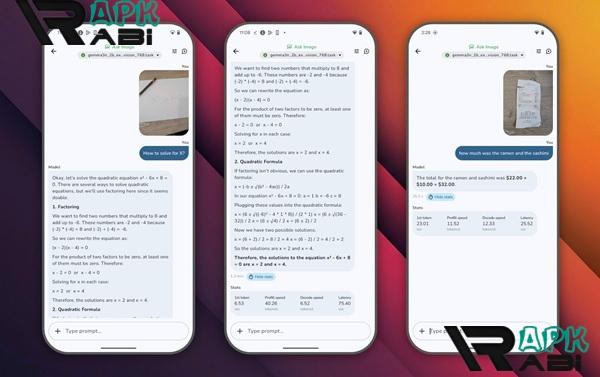
Google AI Edge Gallery is a pioneering app developed by Google’s AI and research teams to provide users with access to advanced AI models that operate directly on their mobile devices. It functions as a testing ground for various tasks including chat-based interactions, image understanding, prompt-based text generation, and even real-time model benchmarking.
Advertisement
Rather than relying on server-based APIs, all computation occurs locally using Google's LiteRT runtime engine. This makes it ideal for users concerned with data privacy, latency, and network reliability. The Google AI Edge Gallery APK provides a streamlined interface where users can choose models, experiment with tasks, and analyze performance metrics—all without leaving the app.
Key Features of Google AI Edge Gallery APK
Full Offline Operation
Once a model is loaded onto your device, all functions are processed locally. This includes natural language generation, image interpretation, and prompt execution. By removing the need for an internet connection, the app preserves user privacy and guarantees uninterrupted performance, even in remote or restricted environments.
Model Switching and Comparison
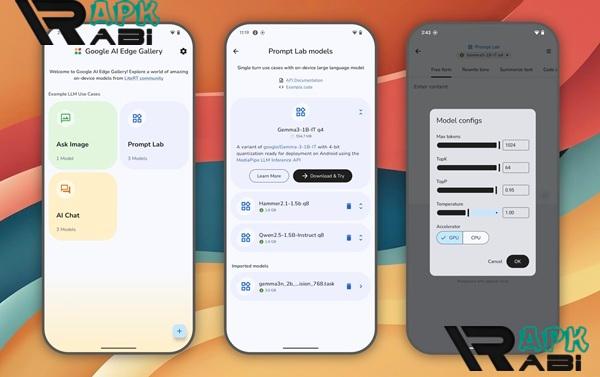
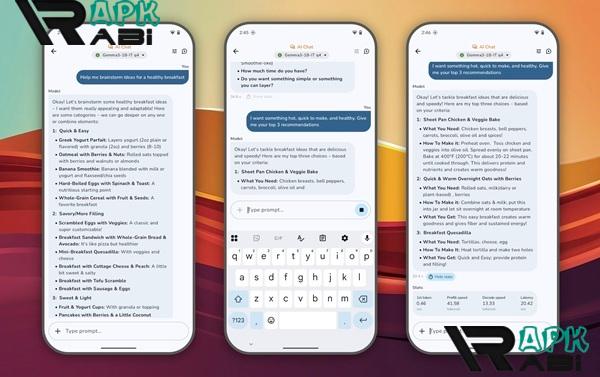
The Google AI Edge Gallery APK latest version supports multiple generative AI models sourced from Hugging Face. Users can load and switch between models with ease, enabling direct comparison of response accuracy, speed, and quality. This is particularly useful for AI developers seeking to evaluate the real-world performance of different architectures under mobile constraints.
Ask Image
A standout feature of the app, Ask Image allows users to upload a photo and ask questions about its contents. The AI model can identify objects, interpret scenes, or answer context-related queries. This feature positions the Google AI Edge Gallery app download as a valuable tool for real-time visual analysis in education, accessibility, and creative industries.
Prompt Lab
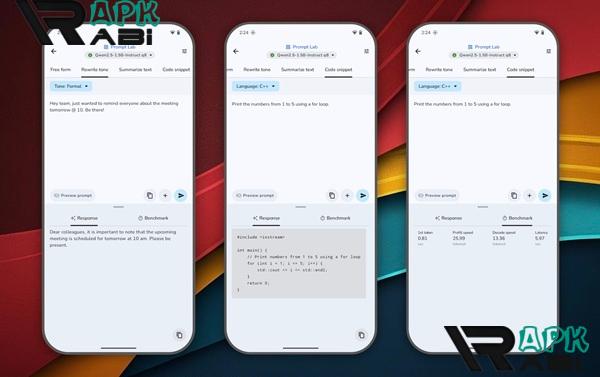
For users interested in content generation or natural language processing, the Prompt Lab provides a sandbox to run single-turn prompts. You can summarize documents, rewrite text, generate code, or ask questions. This is ideal for content creators, researchers, and students exploring the capabilities of different language models.
Multi-Turn Chat
In addition to one-shot prompts, the app also includes a full multi-turn conversational interface. Users can engage in extended dialogue with the AI, testing contextual memory, coherence, and response adaptability over time.
Benchmarking Tools
To support transparency and evaluation, Google AI Edge Gallery includes real-time metrics. These include Time To First Token (TTFT), decode speed, and latency. This information is critical for developers and AI researchers measuring model performance under varying hardware conditions.
Bring Your Own Model
Advanced users and developers can upload their own LiteRT-compatible .task models into the app. This feature opens the door for custom enterprise solutions, niche experiments, and proprietary model testing—directly from mobile devices.
Use Cases for Google AI Edge Gallery
Education and Research
Teachers and students can use the app to explore prompt engineering, analyze model behavior, or study AI principles—all without a cloud account or complex hardware. The fully offline nature of the Google AI Edge Gallery APK makes it ideal for institutions with limited internet access or high privacy requirements.
Prototyping and Development
With access to real-time metrics and the ability to switch between models, developers can rapidly prototype edge-AI apps using the Google AI Edge SDK for Android. Whether it's testing latency, exploring architecture trade-offs, or validating performance on different devices, the app serves as a reliable foundation.
Accessibility Tools
By leveraging the Ask Image feature, users can identify objects and describe environments. This functionality can be adapted to assist visually impaired users, or serve as the core of educational tools for early learners and language learners.
Creative Productivity
Writers, coders, and designers can use the Prompt Lab for on-the-go brainstorming. Whether you're generating taglines, rewriting marketing copy, or drafting code snippets, the app offers high-quality output without depending on online AI tools.
Advertisement
Privacy-Sensitive Environments
In sectors like healthcare, finance, and legal services where user data is highly sensitive, the ability to run generative AI locally is a major advantage. The Google AI Edge Gallery APK mod version, if available, could even enable enhanced or unlocked developer capabilities without exposing data to the cloud.
Google AI Edge SDK for Android
The Google AI Edge SDK for Android is the technical backbone behind this app. It offers a standardized environment to develop, test, and deploy edge AI applications across mobile devices. Key components of the SDK include:
-
LiteRT Runtime: Optimized for mobile inference, this lightweight runtime supports rapid model execution with minimal memory usage.
-
LLM Inference API: Facilitates large language model operations such as tokenization, decoding, and embedding generation.
-
Model Conversion Tools: Supports the preparation of custom models into
.taskformats compatible with the Edge Gallery environment.
Together, these components enable developers to move from model creation to mobile testing in a streamlined workflow.
Performance Insights
The Google AI Edge Gallery download provides valuable feedback about how AI models perform under real-world constraints. Benchmarking metrics such as TTFT and latency help developers tune their models, optimize prompt structure, and test compatibility across devices. Unlike generic AI tools, this app is built for transparency and experimentation.
Performance varies by device. On flagship smartphones, users can expect fast response times and high-quality output. On lower-end devices, the app still functions but may require loading lighter models to preserve responsiveness.
Comparison with Cloud-Based AI Tools
| Feature | Cloud AI Tools | Google AI Edge Gallery |
|---|---|---|
| Requires Internet | Yes | No |
| Data Privacy | External Servers | Local Processing |
| Latency | Network Dependent | Device Dependent (Low) |
| Model Switching | Limited or Paywalled | Freely Available |
| Custom Model Support | Limited | Supported via .task format |
| Ideal for Prototyping | Sometimes | Highly Suitable |
The Google AI Edge Gallery APK redefines what’s possible on-device. It brings the flexibility and richness of cloud AI tools to mobile environments—without compromising on speed, reliability, or data control.
Future Outlook: Google AI Edge Gallery iOS
While currently available on Android, Google has confirmed that Google AI Edge Gallery iOS is in development. The iOS version will enable users on iPhones and iPads to experience the same fully offline AI capabilities, including support for Apple-optimized models and enhanced performance through Metal acceleration.
With both Android and iOS support, Google’s edge AI vision will reach millions more users worldwide, reinforcing the importance of privacy-first, mobile-based AI experiences.
Final Thoughts
The Google AI Edge Gallery APK is not just another experimental app—it represents the future of AI accessibility. By making generative tools available directly on smartphones and tablets, Google is redefining how users engage with AI: privately, securely, and without infrastructure constraints.
From education and research to development and accessibility, the use cases are broad and deeply impactful. Whether you're a developer evaluating performance, a teacher demonstrating AI concepts, or a creative professional looking for inspiration, Google AI Edge Gallery delivers value at every level.
With iOS compatibility on the way and continued support for Hugging Face models, the platform is poised to become the leading solution for offline, mobile-based AI applications. If you’re serious about understanding or leveraging on-device generative AI, the Google AI Edge Gallery APK latest version deserves a place on your device.
Let's build community together and explore the coolest world of APK Games/Apps.





1. This is the safest site on the Internet to download APK. 2. Don't ask about the Play Protect warning, we've explained it well, check here. 3. Do not spam, be polite and careful with your words.